
Leveraging AI to reduce manual effort, streamline workflows, and improve user efficiency.
Designing an AI-Powered Tool for
Faster, Smarter Workflows


Summary
Users faced time-consuming, manual processes that slowed productivity and limited scalability. Existing workflows lacked automation, requiring significant effort to complete repetitive tasks.
This project focused on integrating AI to streamline workflows, reduce friction, and support faster decision-making - enabling users to complete tasks more efficiently and with greater confidence.
The Problem
Enterprises often rely on large, outdated codebases with minimal documentation:
-
Research and design workflows are time-intensive and inconsistent
-
Teams rely on fragmented tools and manual processes
-
Early-stage exploration is slow, limiting iteration and coverage
Replacing or updating these systems is risky and expensive due to the difficulty of understanding the embedded business logic.
Role: Lead UX Designer
Owned end-to-end design, including workflow design, user research, prototyping, interaction design and collaboration with engineering. Designed solutions using and extending the design system to ensure consistency, scalability, and efficient implementation.

My Approach
-
Identified high-friction workflows in research and design processes
-
Explored how AI could accelerate early-stage work
-
Designed structured interactions to guide AI outputs
-
Validated outputs through real-world usability and iteration
Technical Collaboration
I worked closely with engineering to ensure:
-
Interaction patterns aligned with front-end architecture
-
Accessibility requirements were implemented using semantic HTML and ARIA roles
-
Designs were production-ready and scalable
My understanding of front-end code allowed me to validate feasibility early and reduce iteration cycles during development.
AI and Human Workflow
AI was used to generate initial outputs (interview plans, prototypes, user stories), accelerating early-stage exploration.
I evaluated, refined, and validated outputs through real user research and product constraints before finalizing designs in Figma.
The Research
This phase was crucial in defining the core value proposition of the product, identifying the target audience and understanding the problem it solves.
Assumptions
In the beginning, we assumed a product team would largely be responsible for this part of the work and targeted our research towards this persona. Early on in the interviews however, it became very clear we needed to pivot towards the developer and therefore shifted our research to interview engineers, specifically ones working on modernization projects with legacy systems, usually involving COBOL (banking, insurance etc) and highly sensitive data.
Define Objectives
-
Research questions
-
Research methods
-
Expected outcomes
-
Determine personas
-
Determine stakeholders
Expected Outcomes
-
Gain process knowledge
-
Desired features
-
Past experiences
-
Create data driven culture
-
Eliminate manual process
Research Methods
-
User interviews
-
Interview analysis
-
Research papers
-
Surveys
-
Usability testing
Target Persona (quick details)
Emilio Holiday is a senior software engineer, leading a team of developers who are all well versed in modern technologies and expert at writing efficient code.
The company that hired them has a 30 year old mainframe system that needs to modernize so they can continue to provide the same services to their clients without disruption.
Research Methods
-
15 mainframe developer interviews
-
8 mainframe research papers
-
3 surveys to mainframe teams

Key Research Findings
-
Due to security risks, companies are preferring to keep sensitive data on their mainframes and modernize systems into the cloud like analytics and reporting.
-
Attempting large scale migration without fully understanding workload interdependencies or time and budget needs has led many to underestimate the impact of modernization and project failure.
-
Legacy applications are not designed to support continuous delivery, as some components within these applications create obstacles - or friction points - that negatively impact business operations.
-
Poor coordination between product and modernization teams - and lack of engagement with business leaders - will undermine continuous modernization efforts.
-
Main reasons to spend money on a modernization project: license costs, lack of scalability, stability and performance, customer complaints, security issues, industry competition and a desire for greener industry.
-
Problems faced by modernization teams: dead code, difficult to understand systems and business logic, lack of documentation, outdated processes and tools.
-
By prioritizing the mainframe developer experience and automating manual activities organizations can deliver even greater value to their businesses.


Brainstorming
We analyzed interview data in Dovetail, using tags aligned with our research script to surface key themes and insights
Affinity Mapping
To synthesize the raw data and get a better picture of problem areas, I facilitated a workshop using Miro to create an affinity map and group user feedback, pain points and behaviours to find patterns. Using sticky notes, the team grouped related ideas. This helped us identify recurring issues and unmet user needs that informed feature priorities.
Participants were: design, product and engineering.

User Journey Map
I facilitated this workshop using Miro to analyze the research findings. The team mapped pain points and opportunities in a Miro experience map to visualize the user journey pain points and opportunities.
Once complete, we presented our findings to stakeholders, including key takeaways from the research reports.
Participants were: design, product, engineering, sales.
.png)
After:
-
Automated generation of workflows and scenarios
-
Faster iteration and exploration
-
Centralized and structured outputs
Before:
-
Manual workflows required significant time and effort
-
Users relied on fragmented tools and processes
-
Limited ability to explore edge cases
Before & After
The Design
Figma Prototype
After some initial testing with low fidelity wireframes where we defined the structure, layout and flow, we moved to a higher fidelity prototype.
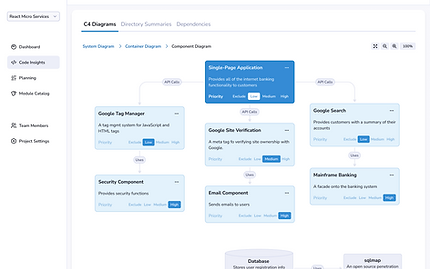
Using components and the color scheme from our design system, I created a prototype using Figma to make the user testing as real as possible. The user testing results provided us with valuable insights into the features we'd designed for. We ended up removing some of the less useful data points, simplifying the solution into 3 main diagrams for an MVP release that would illustrate the code and highlight issues for the developer.
Figma Interactions
Included in this screen shot are the interactions shown in Prototype Mode in Figma. They illustrate the interactions including triggers and navigation type designed to make this prototype feel as real as possible. The design system provides variants of each component used to design such things as button states etc.
This was very helpful in testing the interactions and communicating intent to stakeholders and engineers. It bridges the gap between static design and live experience and ensures the design is easy to understand.

Usability Testing
Using AI as a tool to assist in the script writing, I created a couple of tasks for the users to complete in the test:
-
Log in to the app and connect your GitHub account
-
Use the wizard to determine your desired outputs
-
View and refine the code diagram
-
Review and refine the feature list details

Final Design


Next Steps
Product, engineering and design had planning sessions around the work to be done, splitting it into 4 stages to be completed over an 8 month period, in 2 week sprints. We had a demo at the end of each sprint to show progress and gather feedback.
The System Diagrams were complex, so a front end developer worked on those in parallel to the rest of the platform. Feedback from engineers during the coding phase was essential for success, and allowed us to identify several edge cases we’d missed.
The rest of the data points were used in the product side of the platform targeted for a later release, to show a Product Requirements Document of features, their priority, code snippets and a module library along with AI peppered throughout to provide suggestions and allow the user to provide context to the solution to customize the outcome.
After successful release the plan is to add to code insights, bringing more value to the user and implement some of the other thoughts from our user interviews.
Outcomes & Impact
-
Reduced time spent interpreting legacy code by over 60%, based on early pilot feedback.
-
Helped define key product differentiators (e.g., traceable AI reasoning, requirements tagging).
-
Created a scalable design language and research ops toolkit for the broader product team.
-
Enabled stakeholders to make confident, strategic decisions by exposing hidden logic within their systems.


Reflection
Thoughtful integration of AI enhances - not replaces - human decision-making in product design.