Modernized a legacy care coordination system into a cloud and
mobile platform - improving real-time communication by 80%
and increasing task completion efficiency by 34%.
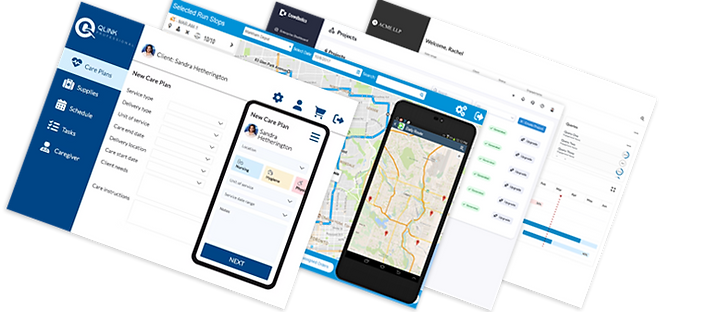
Designing a Mobile-First Healthcare Platform for Real-Time Care Delivery
_edited.png)


Summary
Healthcare delivery has rapidly shifted beyond clinical settings into patients’ homes - but the tools supporting care teams hadn’t kept up.
The original platform was a legacy, desktop-first system used by care coordinators to manage scheduling, patient records, and staff logistics. It was difficult to use, fragmented across modules, and inaccessible to frontline workers in the field.
This created inefficiencies, communication gaps, and increased risk in care delivery.
Background
Home care workers and coordinators relied on disconnected systems, manual processes, and delayed communication.
-
Critical information (scheduling, care plans, medications) was siloed
-
Care workers relied on printed notes that could be lost or outdated
-
Coordinators lacked visibility into real-time field updates
-
The system was not optimized for mobile use in active care environments
Impact
-
Increased administrative burden
-
Reduced care accuracy
-
Delayed updates to patient care plans
Role: Senior UX Designer
I worked across the full product lifecycle - from research to implementation - on a platform used by care coordinators and home care workers.
Responsibilities included:
-
Leading user research and synthesis
-
Facilitating cross-functional workshops
-
Defining user flows and interaction patterns
-
Designing and prototyping end-to-end experiences
-
Contributing to design system components
-
Translating designs into front-end code for implementation alignment
Users & Context

1
Home Care Workers
Care providers travelling to client homes to perform tasks
Needs: Clear task list, ability to work with no connectivity, remote schedule changes, supplies ordering
2
Care Coordinators
Client care coordinators working in the office
Needs: up to date information, digital file processing, OCR scanning
3
Clients
Clients receiving home care services as patients
Needs: Ability to change appointment schedule, self service medication refills, appointment reminders
Approach
We adopted a mobile-first strategy, designing for the most constrained and critical context first: care workers in the field.
Key activities:
-
Conducted interviews and contextual inquiry with care workers and coordinators
-
Performed a heuristic evaluation of the legacy system
-
Mapped end-to-end service journeys to identify breakdowns
-
Rapidly prototyped and validated new workflows
-
Built front-end components (HTML, CSS, JavaScript) to test feasibility and improve developer handoff
Research & Insights
We interviewed 9 participants (care coordinators and personal support workers) to understand workflows, pain points, and constraints in real-world environments.
Key insights:
-
Care workers lacked real-time access to updated care plans
-
Notes were often captured on paper and lost or delayed
-
Coordinators struggled to track visit completion and updates
-
Users were concerned about adopting a complex new system
These insights highlighted the need for a simple, reliable, mobile-first experience that reduced cognitive load and supported real-time communication.

Design System & Component Strategy
To support consistency across mobile and cloud platforms, I contributed to a scalable design system aligned with both user needs and engineering constraints.
Key contributions:
-
Defined reusable components:
-
Task lists with status states
-
Patient and visit cards
-
Medication tracking modules
-
Mobile-optimized form inputs
-
-
Established visual standards:
-
Accessible color tokens and contrast ratios
-
Typography optimized for quick scanning in clinical environments
-
-
Designed interaction patterns:
-
Offline states and sync behavior
-
Status indicators for critical actions
-
I worked closely with engineering to ensure components translated directly into reusable front-end patterns.
Bridging Design & Front-End
To reduce the gap between design and development, I translated key components into production-ready front-end code.
This included:
-
Building reusable UI components using HTML, CSS, and JavaScript
-
Validating responsive behavior across devices
-
Testing real-world scenarios (offline use, long-form data, edge cases)
-
Ensuring design fidelity during implementation
This approach improved collaboration, reduced ambiguity in handoff, and accelerated delivery.
Accessibility Considerations
Accessibility was critical in a healthcare context where usability directly impacts outcomes.
Key considerations:
-
Designed for low-vision and high-stress environments:
-
High contrast ratios
-
Large tap targets for mobile use
-
-
Reduced cognitive load:
-
Clear hierarchy and scannable layouts
-
Progressive disclosure of complex data
-
-
Improved system clarity:
-
Visible task states and confirmations
-
Error prevention and recovery patterns
-
These decisions ensured the product was usable in fast-paced, real-world care scenarios.
The Design
User Flows
We designed a connected ecosystem of tools:
For Care Coordinators (Cloud Platform):
-
Unified dashboard for scheduling, staffing, and patient management
-
Real-time visibility into care updates and visit completion
F
or Care Workers (Mobile App):
-
Mobile-first interface for viewing care plans and completing tasks
-
Ability to log notes, track medications, and order supplies in real time
-
Offline functionality with sync capability
This reduced fragmentation and created a single source of truth across the system.

Validation
The solution was tested across 5 clinical environments with real users in the field.
Feedback informed iterative improvements and helped refine workflows before broader rollout.
Concept Design
Before vs After
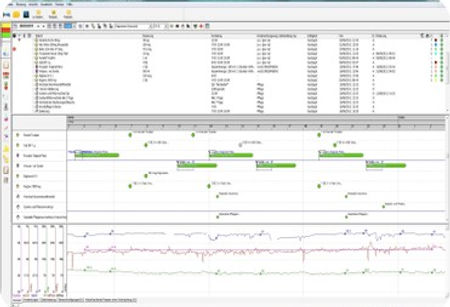
Before:
-
Dense, table-heavy desktop screens
-
Small text, poor hierarchy
-
Not usable in the field
-
Requires printing
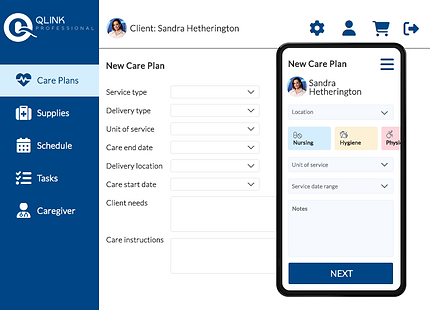
After:
-
Clean, mobile-first task interface
-
Large touch targets
-
Scannable patient info
-
Designed for real-time updates
Outcome & Impact
-
Improved scheduling accuracy and staff coordination.
-
Reduced manual errors in care delivery and documentation.
-
Boosted caregiver confidence and ease-of-use with a streamlined mobile experience.
-
Increased overall client satisfaction and regulatory compliance.
-
Decreased time to complete tasks.
Our mobile app was implemented to support home care workers in the field, enabling them to access schedules, update care details, and store information offline. This approach improved mobile task completion by 34% and reduced cognitive load in mobile workflows (measured across field trials in 5 clinical environments).
As a result, we achieved an 80% improvement in real-time communication and a 60% boost in client satisfaction, greatly enhancing caregiver efficiency and the overall quality of care provided.
“This renewal reflects our continued confidence in the platform’s ability to enable operational efficiencies and long-term value,” said Andrew Prahalad, Vice-President of IT at CBI Home Health. “It allows us to shift from implementation to optimization — unlocking the full strategic potential of operating on a national digital platform.”


Reflection
This project reinforced the importance of designing for complex service ecosystems, especially in healthcare where fragmented tools can directly impact care quality.
By combining user-centered design with system thinking and front-end implementation, we were able to deliver a solution that was both usable and scalable.
One key challenge was balancing speed of documentation with clinical accuracy - future iterations could explore automation or voice input to further reduce manual effort.